Four perfect little columns. Each fixed to 150px.
Not a single pixel between them.
One
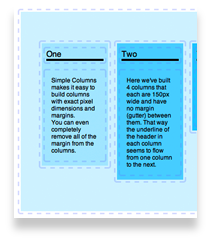
Simple Columns makes it easy to build columns with exact pixel dimensions and margins.
You can even completely remove all of the margin from the columns.
You can even completely remove all of the margin from the columns.
Two
Here we've built 4 columns that each are 150px wide and have no margin (gutter) between them. That way the underline of the header in each column seems to flow from one column to the next.
Three
Simple Columns are built from HTML floats. This lets them get so close they actually touch.
Four
Add just one column or as many as 20. Or adjust them as you add more content. It's easy!
How To
- A Text element for the title. We added a 4px bottom border in the Advanced settings.
- A Text element for the column text. We gave it 10px of padding to give it some breathing room from the edge of the column.
Once we had one column just the way we wanted we copied it (drag + Option key) to the other columns.
Each column has a different background color and the overall.
Finally we adjusted the padding of the Simple Columns stack in the Advanced settings: 50px on the top and bottom, 10px on the sides.